

本地币回款
Jumia一直致力于打造安全、合规的回款模式以提升卖家体验。本地币回款模式通过使用本地币账户帮助卖家伙伴以更灵活的方式完成回款,降低汇率波动导致的损失。
支持国家
尼日利亚NG(NGN)、加纳GH(GHS)、肯尼亚KE(KES)、塞内加尔SN(XOF)、科特迪瓦IC(XOF)、乌干达UG(UGX),其余国家筹备中, 敬请期待。
回款周期
每周(7个自然日),具体回款周期可查看回款模式介绍。
适用对象
- 无非洲本地银行账户的卖家,使用第三方支付服务商提供的本地币账户收款及换汇(美金、人民币等)服务
- 拥有非洲本地银行账户的卖家,使用自有本地币账户收款
合作服务商
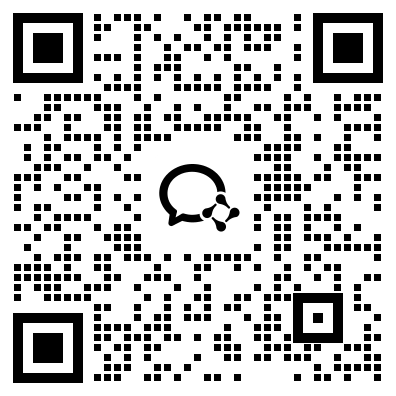
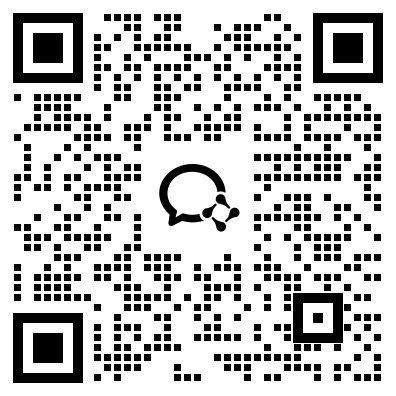
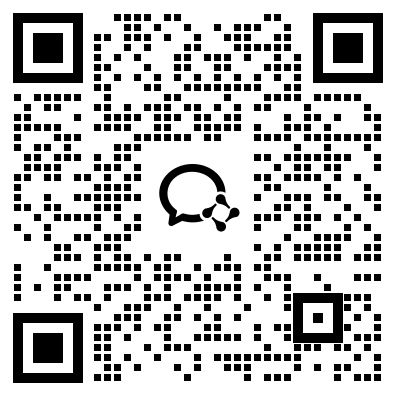
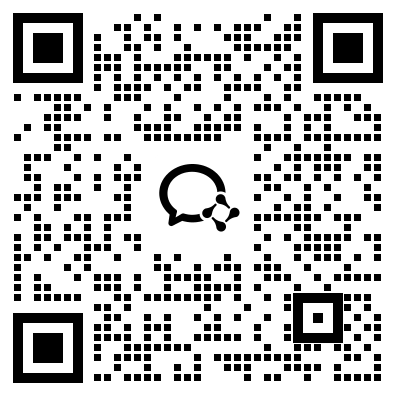
本地币支付商/代理联系方式:
| Pyvio (湃沃) | FuturePay (致远国际) | Payful (盈付) | YeePay (易宝) | Yiyunhui (壹云汇) | XTransfer (信汇宝) |
|---|---|---|---|---|---|
 |  |  |  |  |  |
| Hui+ (汇付国际) | Whalet (易鲸) | Super Great Level | Setya Goods (驿达非) | Dayun (大运) | Yifan |
 |  |  |  |  |  |
如何授权本地币回款账户?
1.账号信息准备
2.Jumia后台添加本地币回款方式
2.1 尼日利亚/加纳/肯尼亚/塞内加尔/科特迪瓦/乌干达
2.1.1 请登录Vendor Center,进入Profile >Payment Information
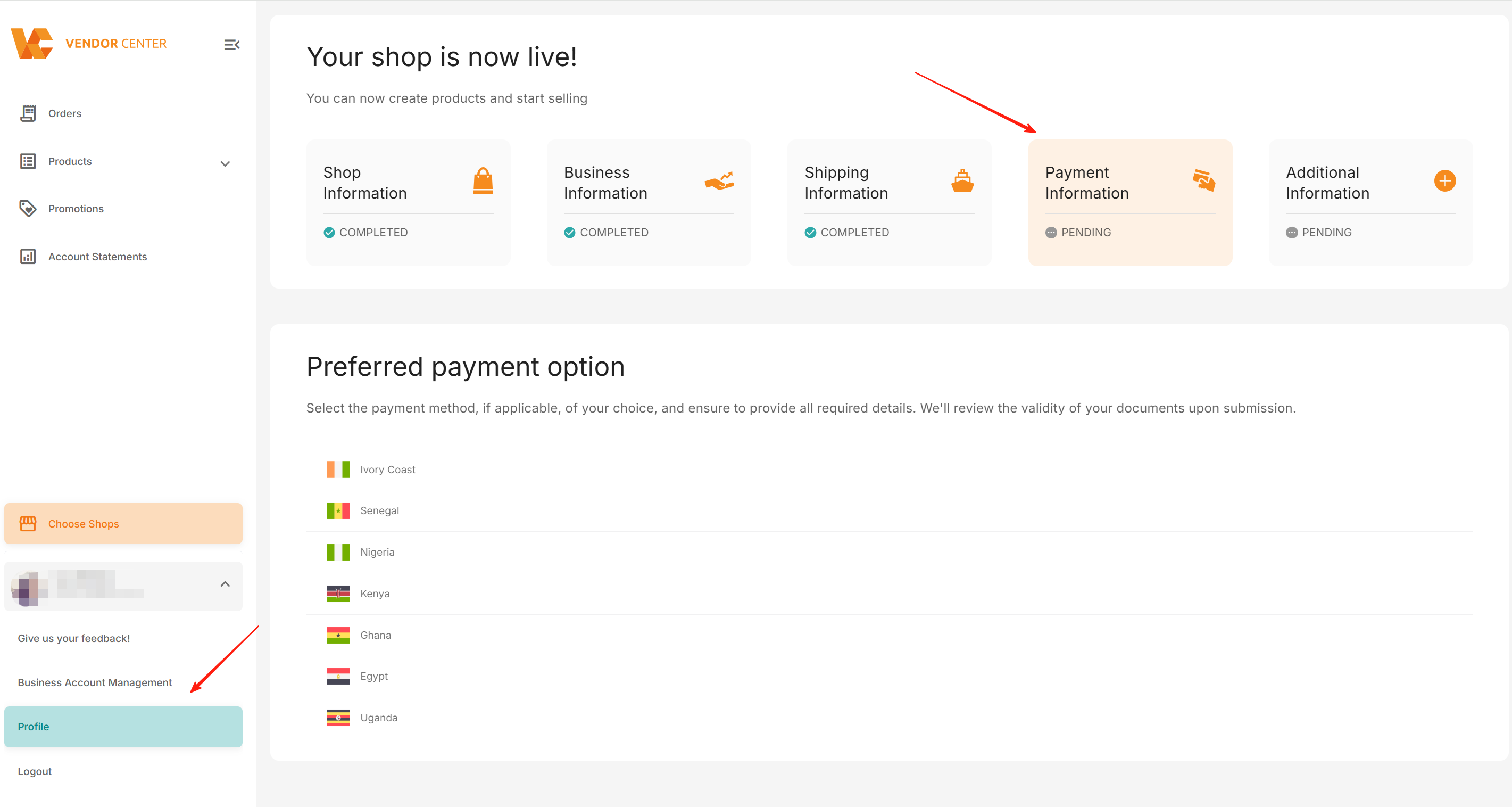
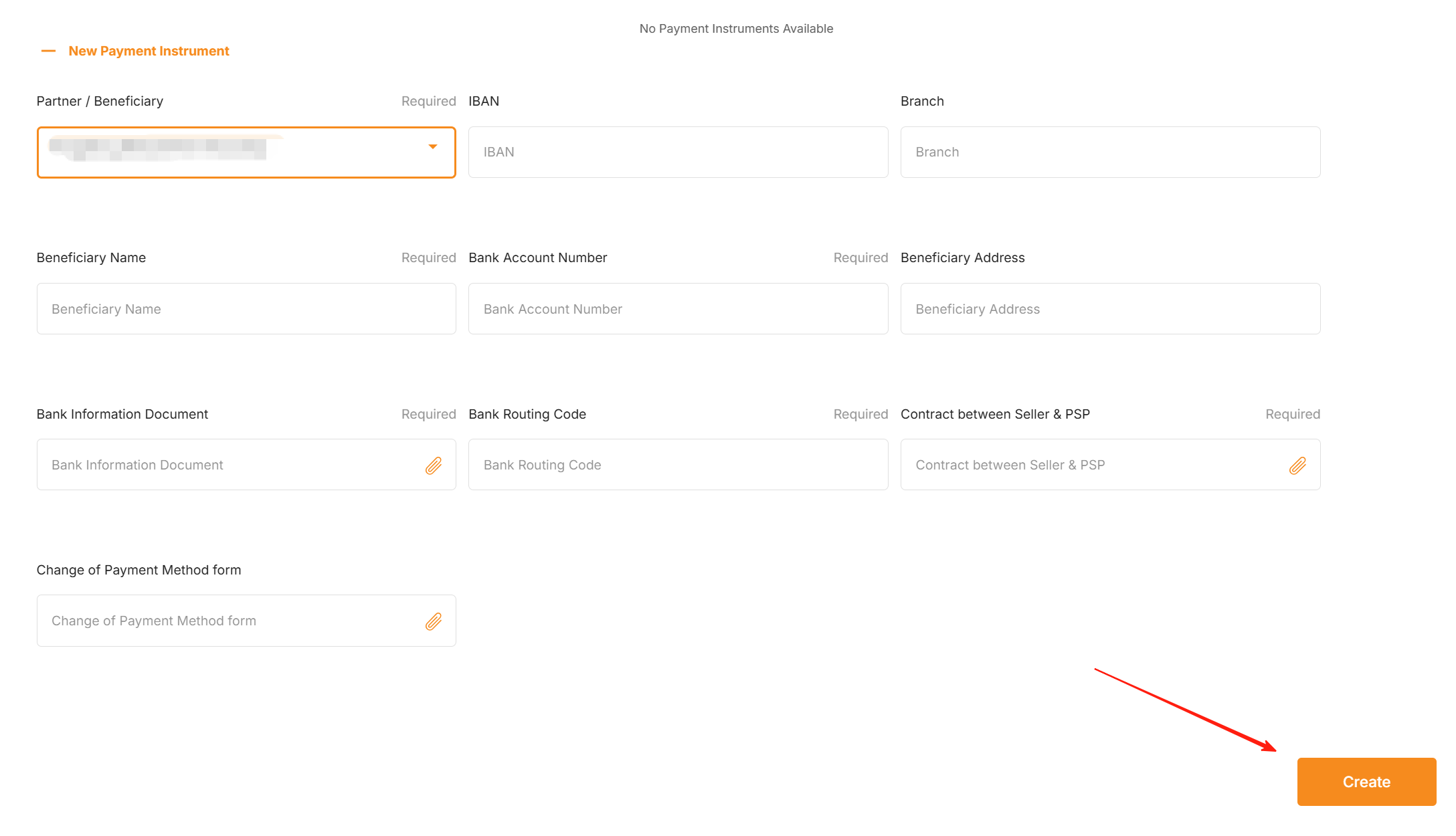
2.1.2 选择对应国家,选择“Bank Transfer”,点击“New Payment Instrument”,“Partner/Benificiary”选择支付服务商。如您使用自有公司非洲本地实体账号回款,请选择“Seller Local Entity”
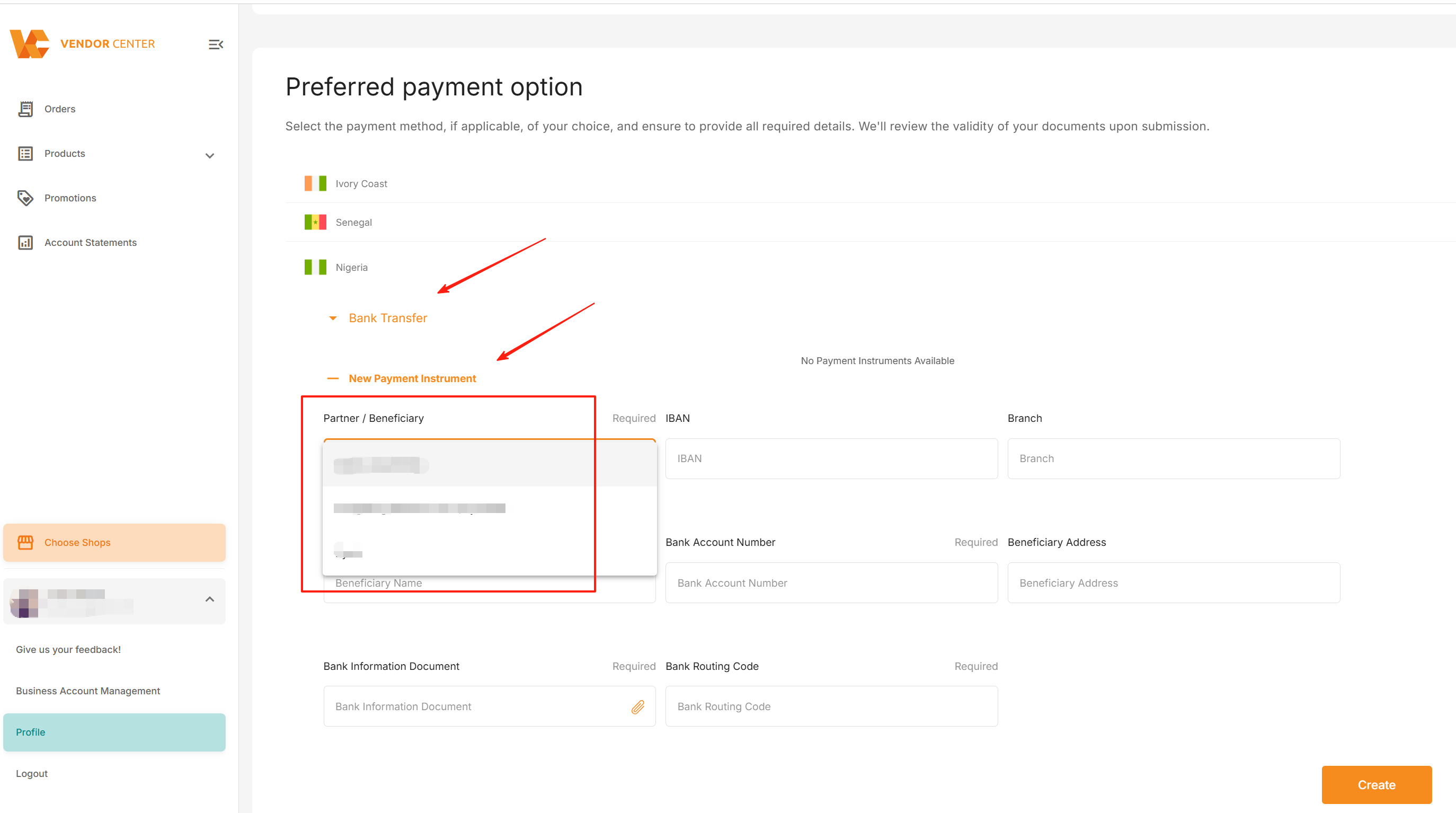
2.1.3 填写本地币账户信息及上传所需合规文件,每个字段框右上角标有“Required” 的代表该项为【必填】项。点击“Create” (所需合规文件详情请点击)
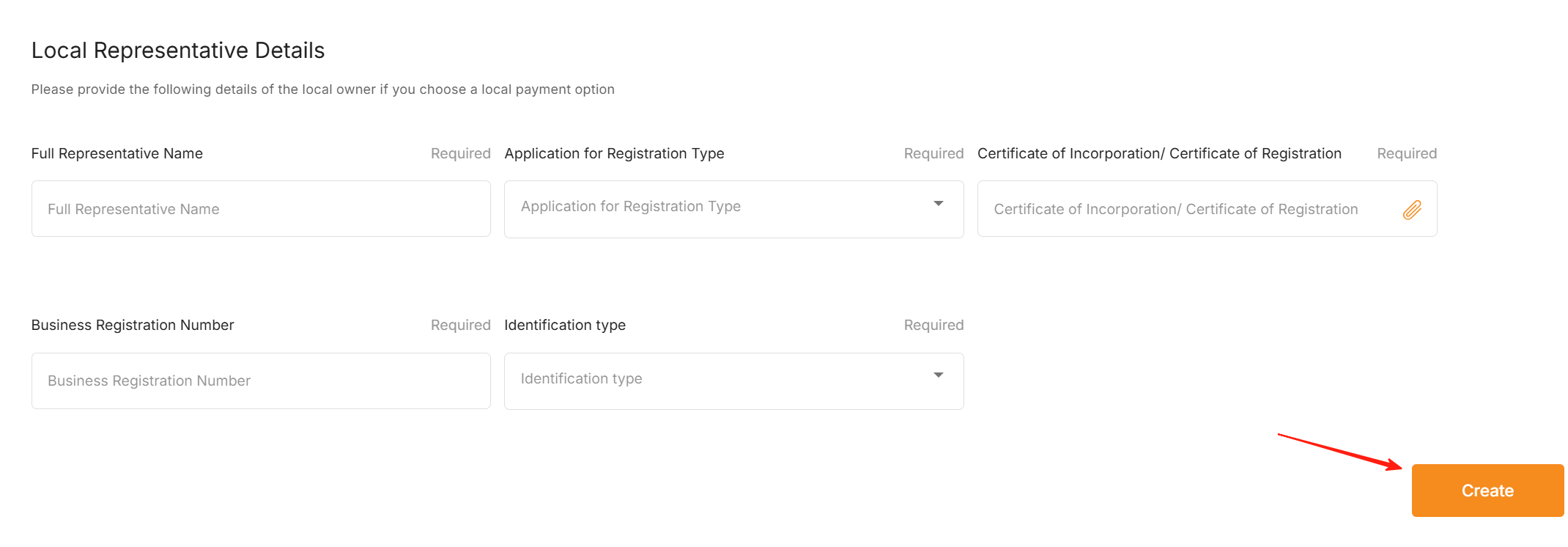
2.1.4 使用Seller Local Entity或受部分国家合规要求,需在“Local Representative Details”补充更多所需合规材料,完成后请点击“Create”(所需合规文件详情请点击)
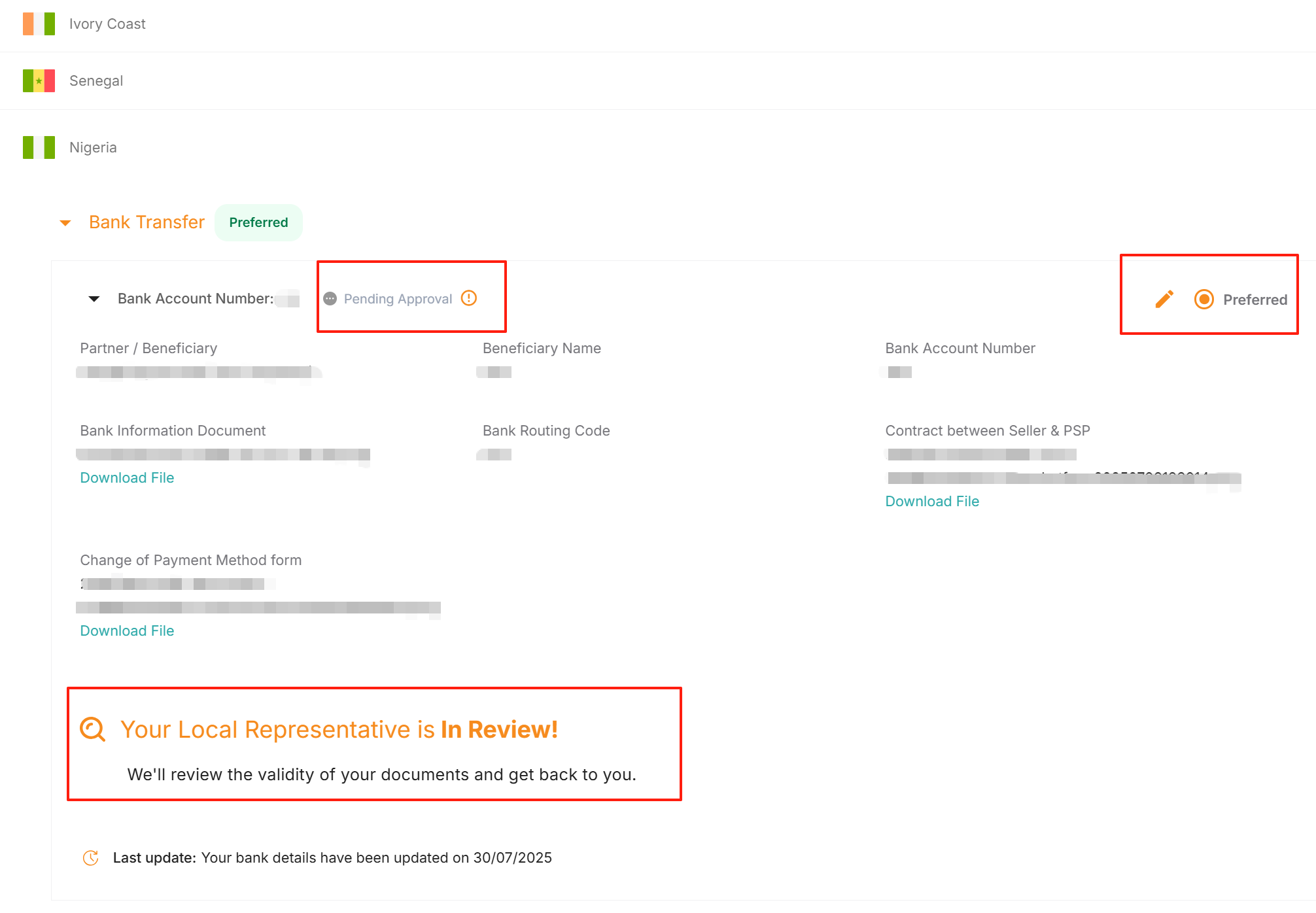
2.1.5 提交创建后,需要设置为默认回款账号“Preferred”才会进入审核流程。
此时状态“Pending Approval”、“Your Local Representative is In Review!”。审核结果将在5个工作日后更新。
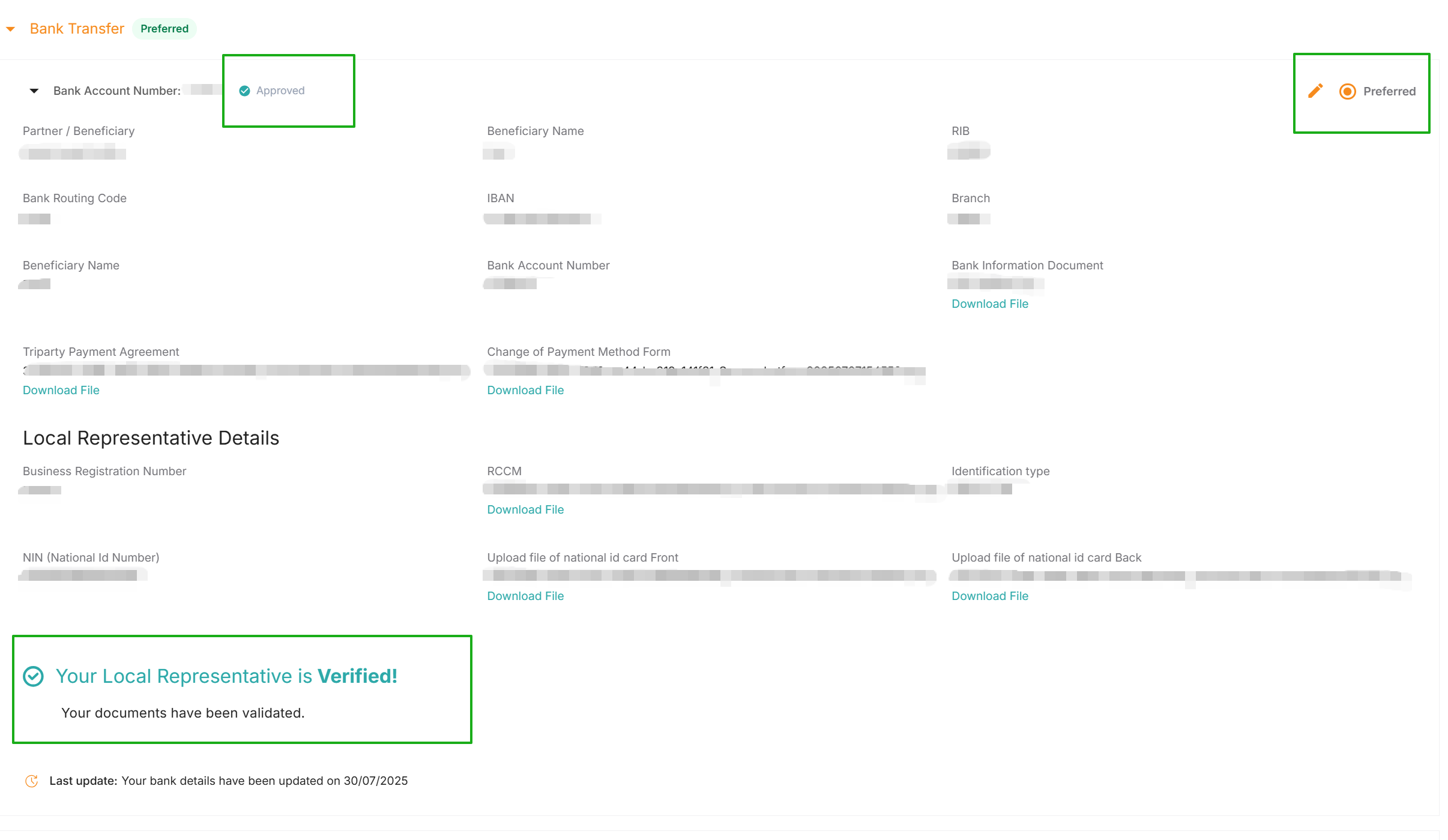
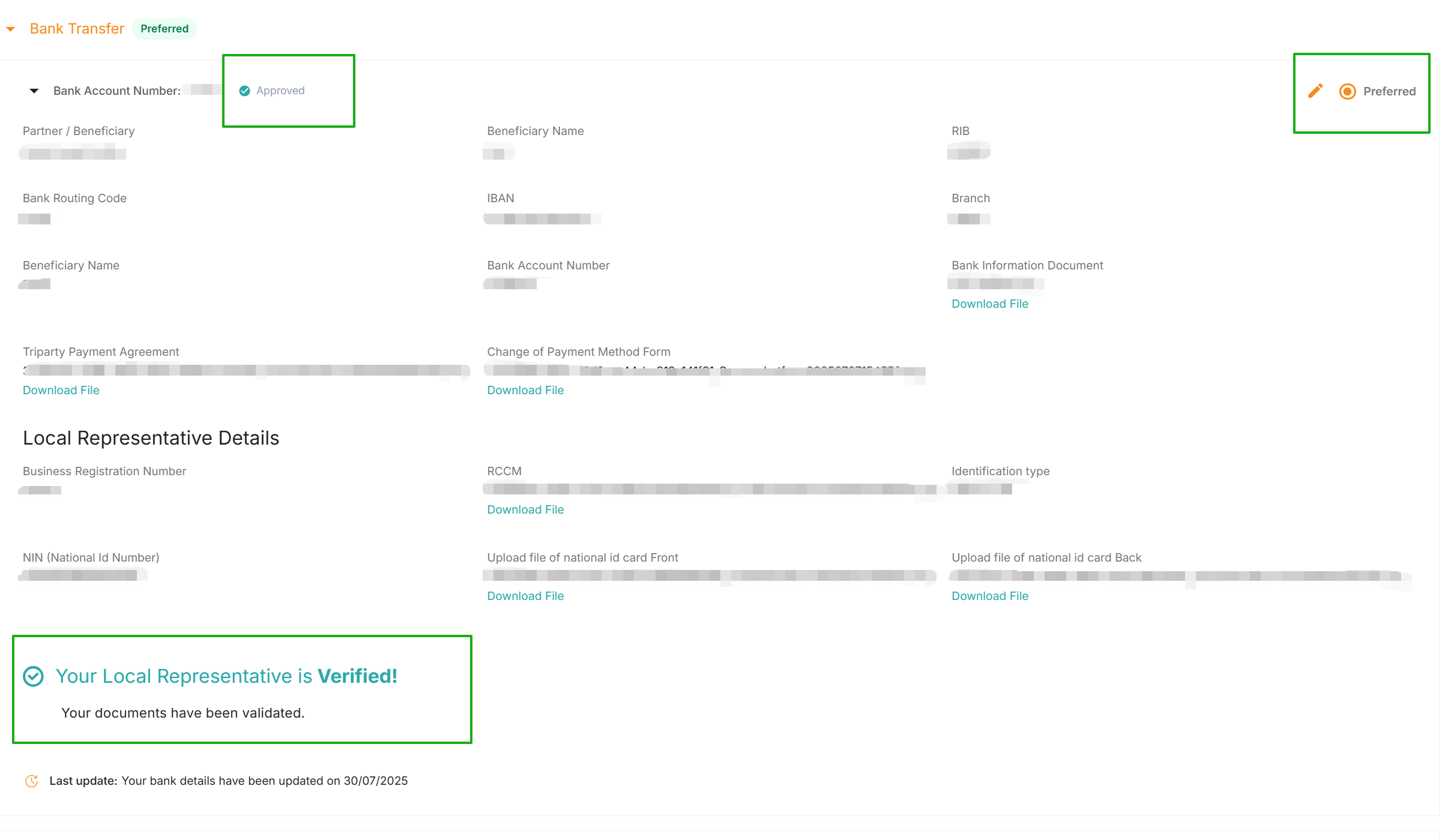
2.1.6 如审核通过,账号显示为“Approved”与“Your Local Represenatative is Verified!”。
账户授权生效,自下一个有盈余金额的账期起,Jumia将回款到该本地账户。
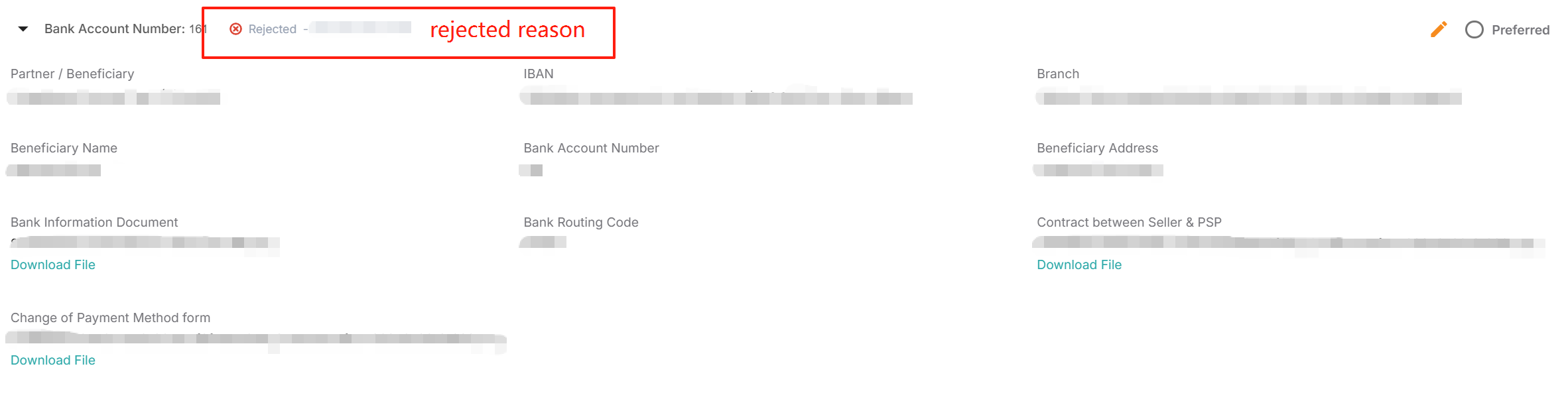
2.1.7 如审核失败,显示“Rejected”,该账号无法授权回款。
此时可根据Rejection reason要求修改信息或重传正确文件。

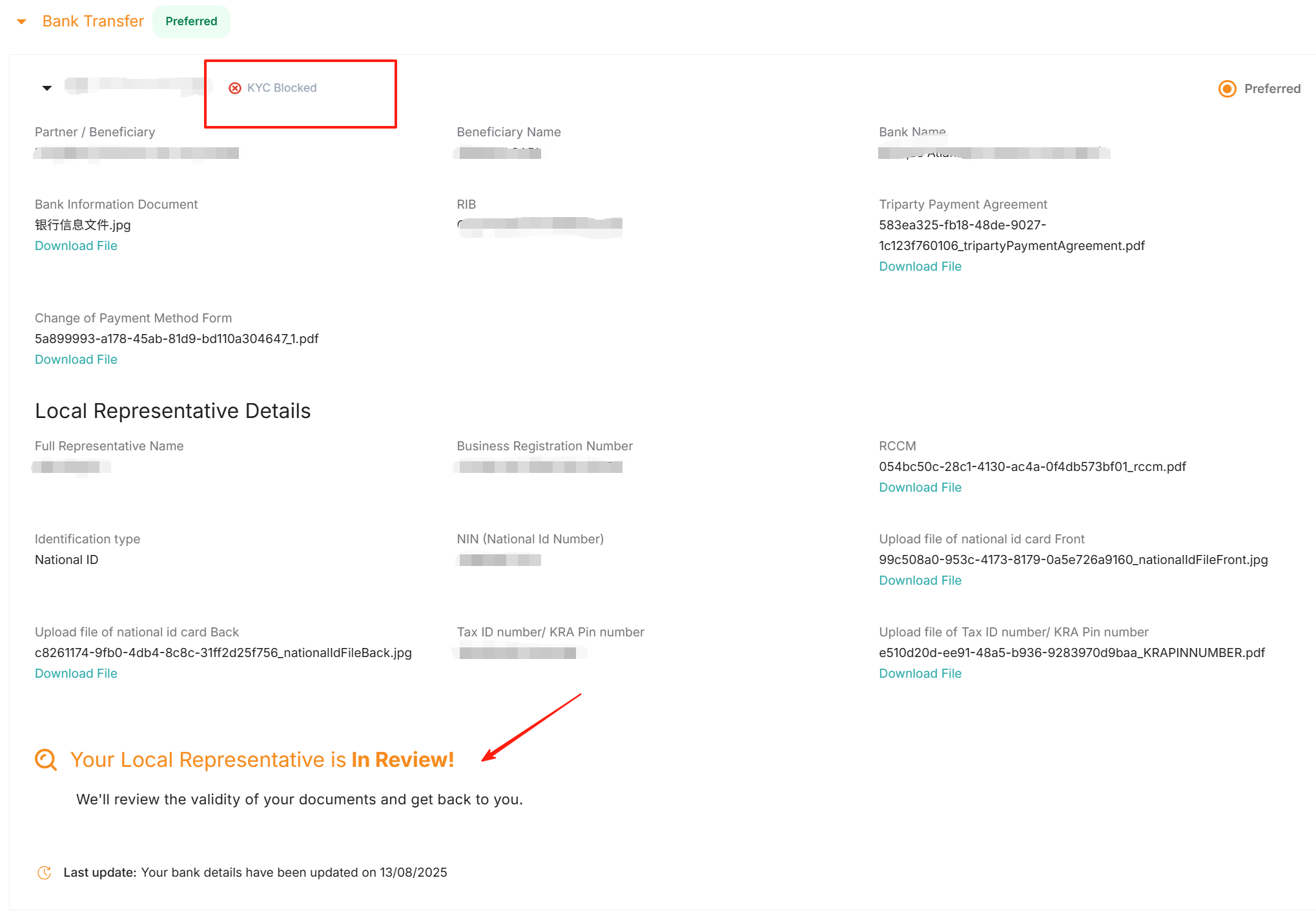
2.1.8 如收款账号显示“KYC Block”且Local Representative审核状态显示“In review”,该状态表明:当地主体(Local Representative)资质目前处于审核流程中,请您耐心等待审核完成。
2.2 埃及
2.2.1 请登录Vendor Center,进入Profile >Payment Information
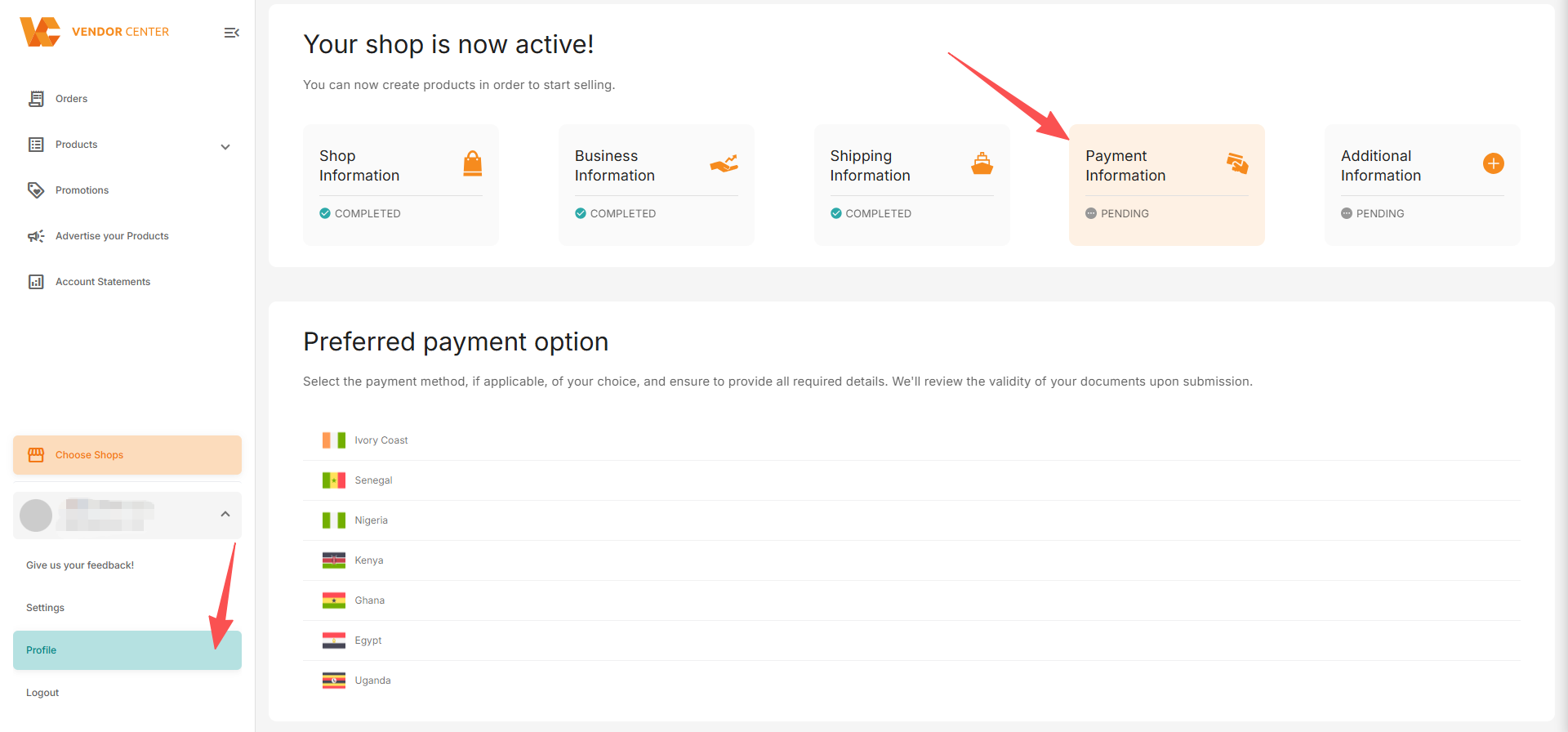
2.2.2 选择Egypt(埃及),选择“Bank Transfer”,点击“New Payment Instrument”。
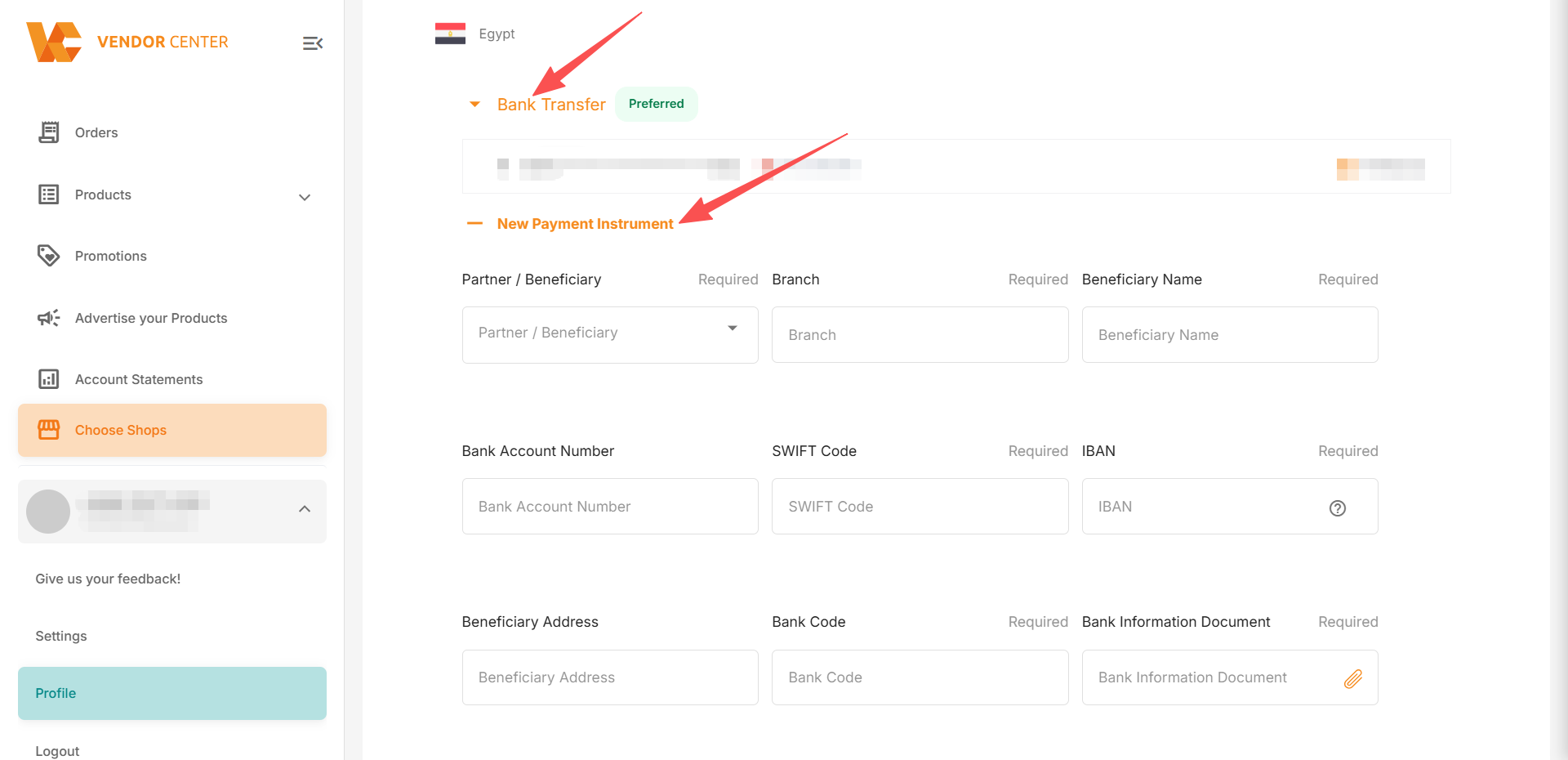
2.2.3 填写本地币账户信息及上传所需银行文件,每个字段框右上角标有“Required” 的代表该项为【必填】项。点击“Create” (所需文件详情请点击)
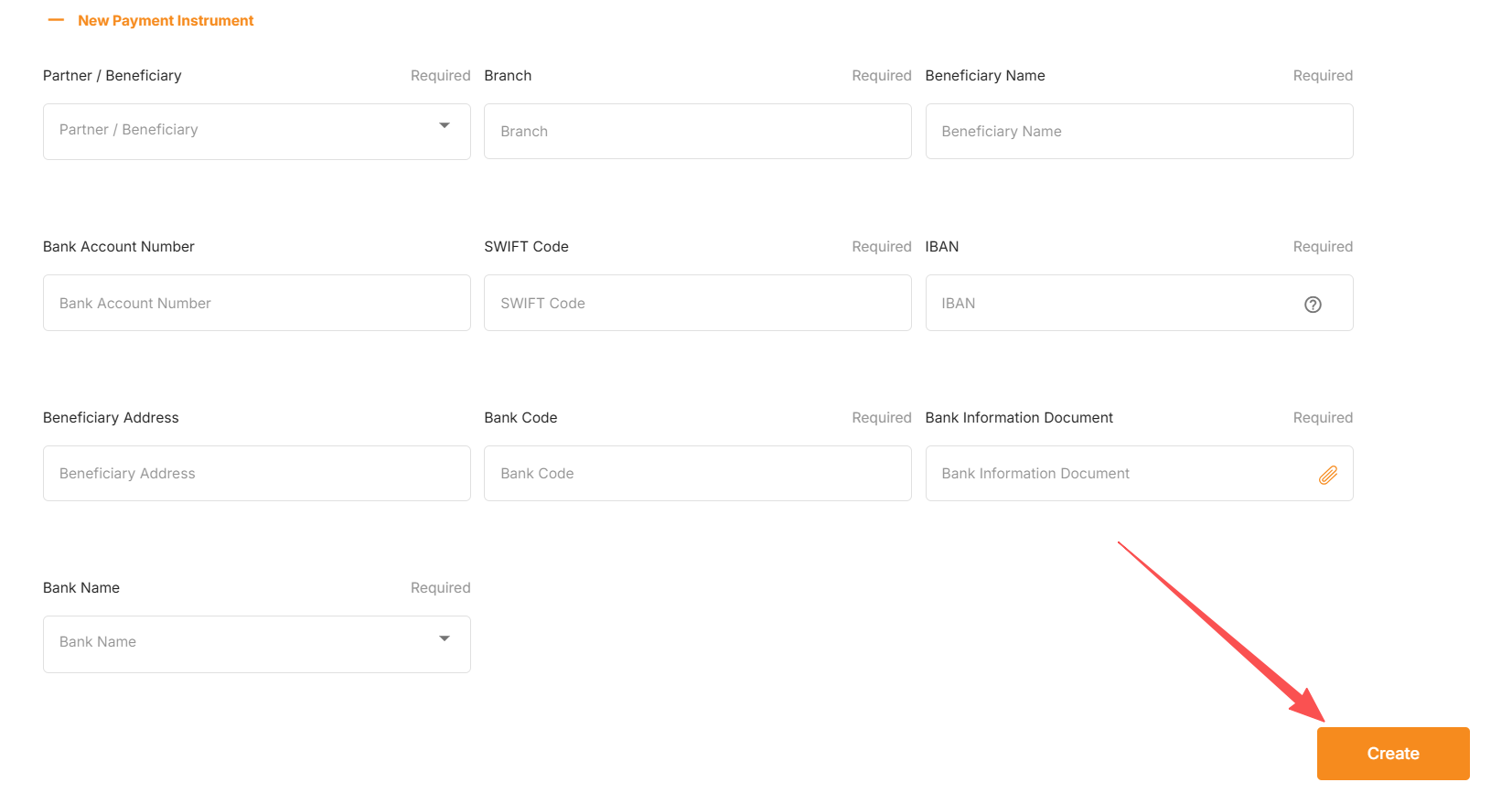
2.2.4 提交创建后,需要设置为默认回款账号“Preferred”才会进入审核流程。
此时状态“Pending Approval”,审核结果将在5个工作日后更新。
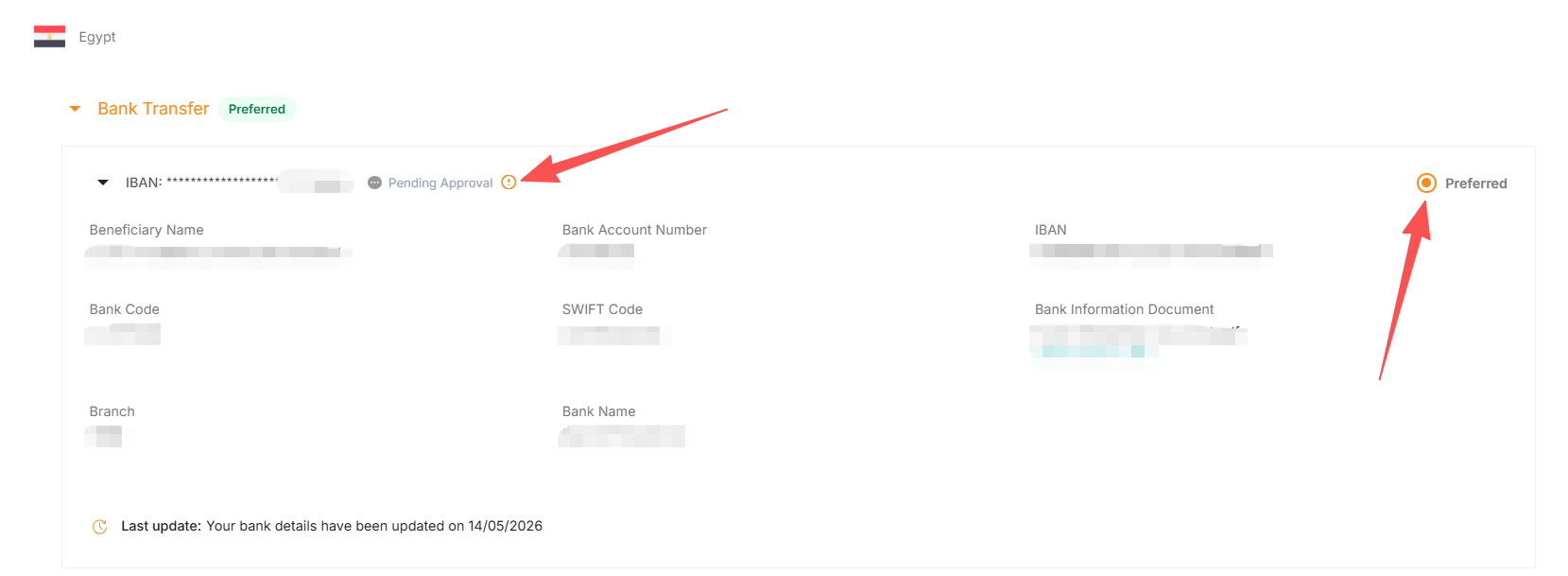
2.2.5 如审核通过,账号显示为“Approved”。
账户授权生效,自下一个有盈余金额的账期起,Jumia将回款到该本地账户。
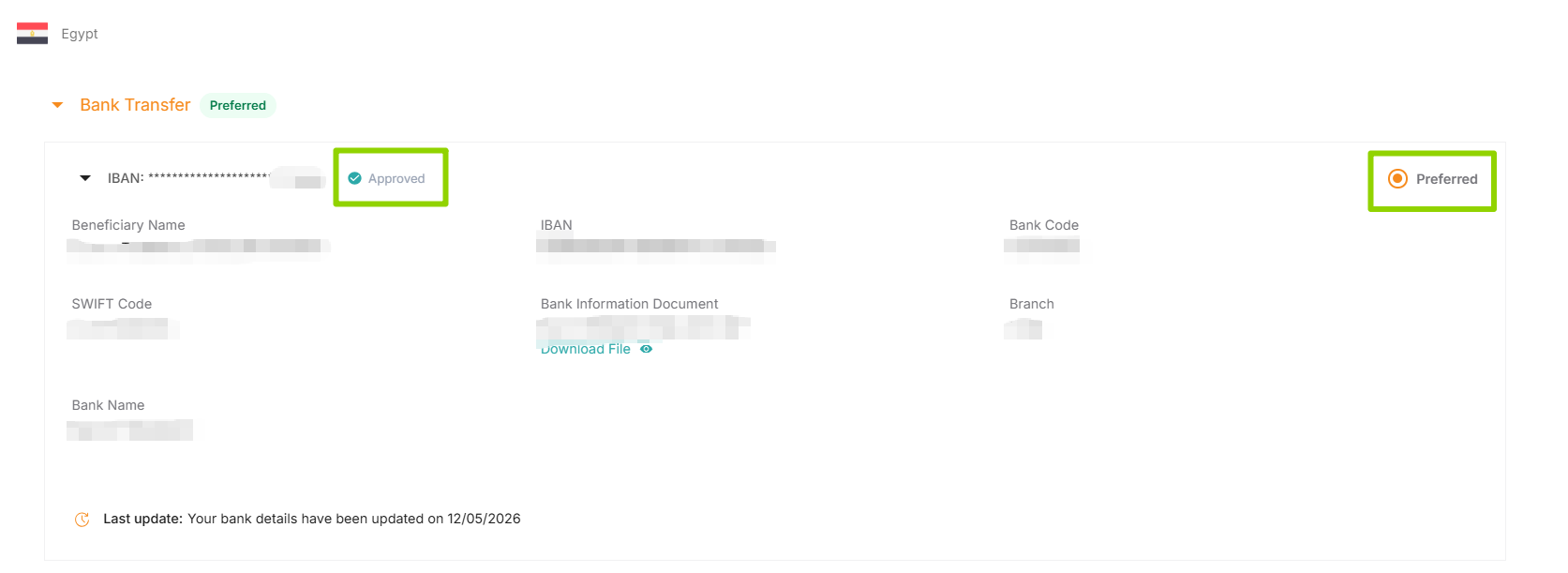
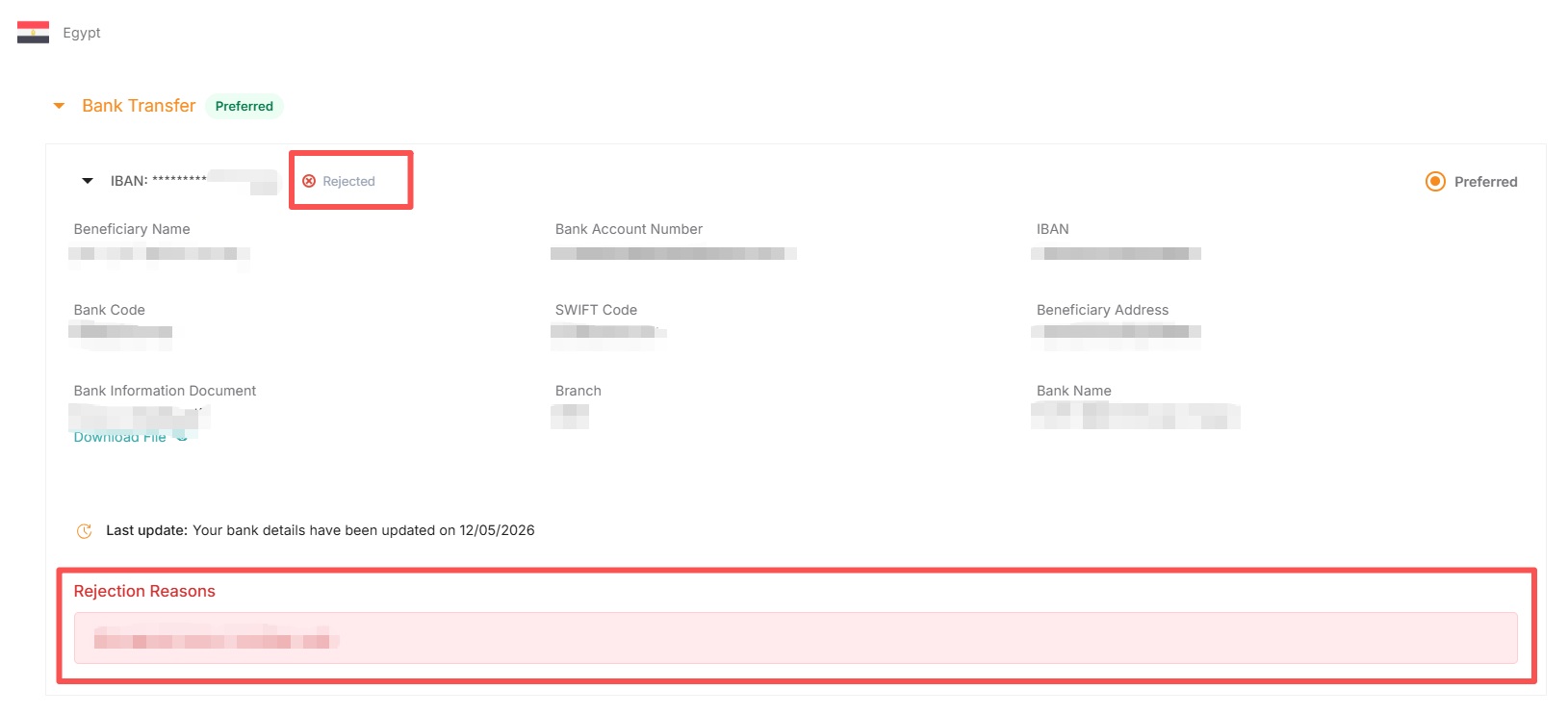
2.2.6 如审核失败,显示“Rejected”,该账号无法授权回款。
此时可根据Rejection reason要求修改信息或重传正确文件。
3.Jumia后台删除本地币回款方式
3.1 选择对应国家,选择“Bank Transfer”,找到您想删除的“Bank Account Number”。
请注意:选择“Preferred”的“Bank Account Number”无法删除。如需删除,请先创建一个新的Bank Account Number并设为"Preferred"。
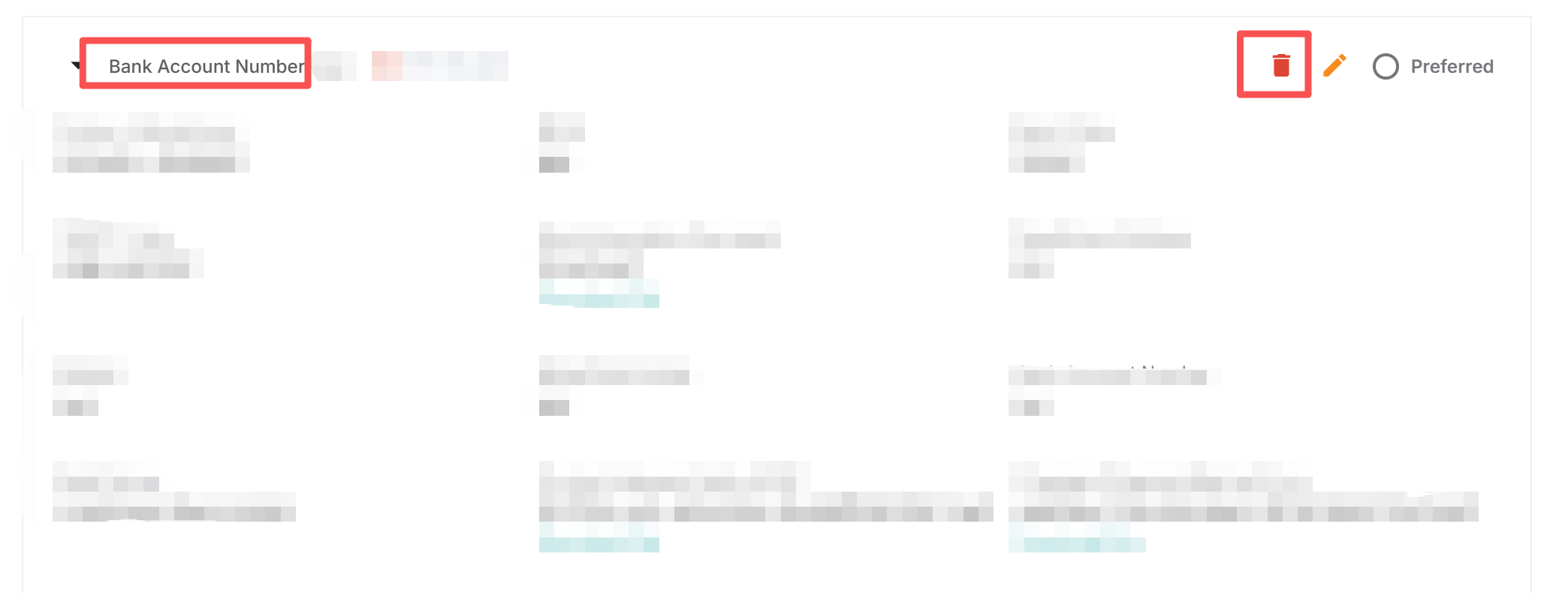
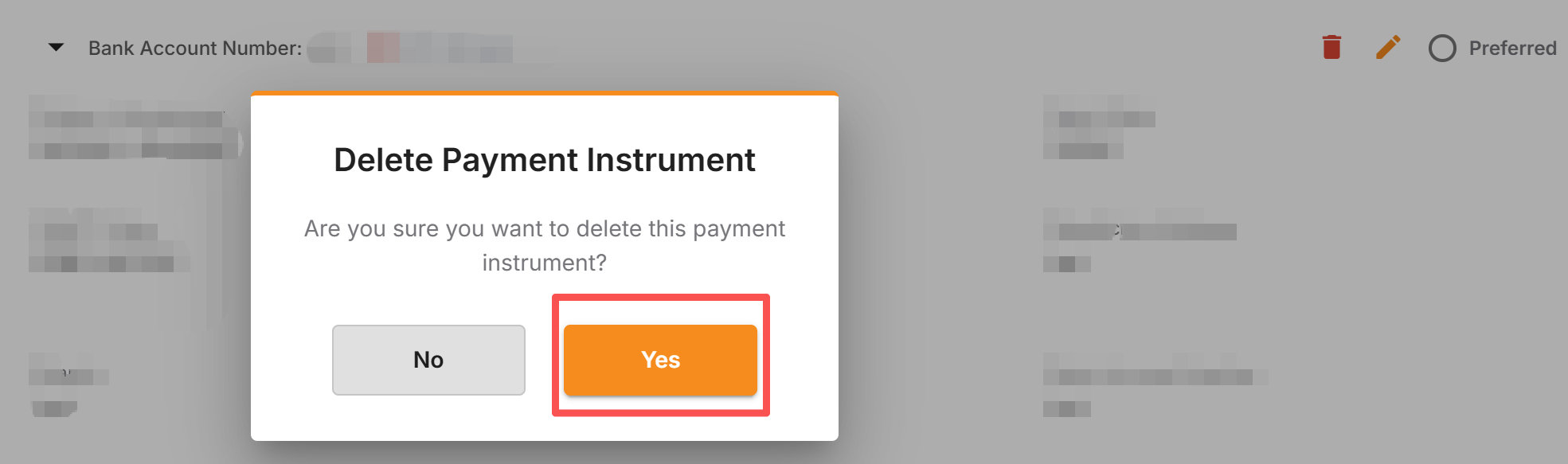
3.2 点击右上角红色垃圾桶图标, 此时屏幕会弹出确认窗口,询问您是否确定要删除。如需删除,请点击弹窗中的 “Yes”按钮即可完成操作。
请注意: 此操作一旦完成,数据将无法恢复。
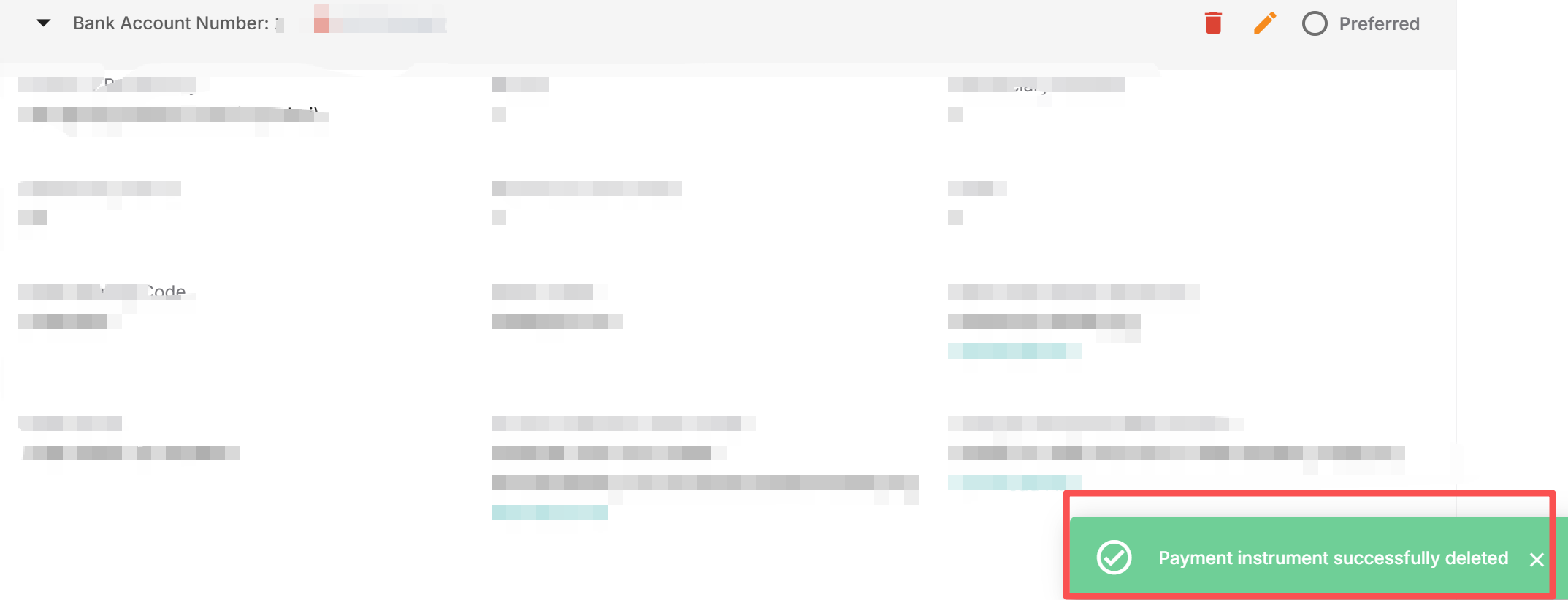
3.3 点击“Yes”后,页面右下角出现“Payment instrument successfully deleted”的提示,即代表该“Bank Account Number”已成功删除。
4.审核状态解读
本地币回款账户审核流程包含两个部分:银行账号+对应当地主体资质。两个部分均审核通过后,回款账户方可生效。
- 银行账号(Bank Account Number)审核状态解读:
- KYC blocked:该收款账号当地主体(Local Representative)资质正在审核中,此时页面下方同步提示为 “Your Local Representative is In Review!”。请等待审核即可
- Pending approval:该收款账号正在审核中
- Reject:信息有误,请根据提示作出相应的修改
- Approved:审核通过
- 当地主体资质(Your Local Representative )审核状态解读:
- In Review:正在审核中
- Rejected:信息有误,请根据提示作出相应的修改
- Verified:审核通过
5.本地货币结算的卖家需同时满足以下的条件
选择本地货币算的供应商,只需同时满足以下两项要求,即可顺利接收回款
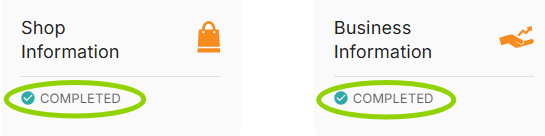
5.1 店铺身份验证(KYC)通过。查询路径如下: 登录VC > Profile > Shop information板块、 Business information板块均为COMPLETED。示例:

5.2 回款账户生效:银行账号、当地主体资质均审核通过。示例:
6.审核未通过原因解读
- 银行账号(Bank Account Number)审核被拒原因解读:
| Reject Reason_EN | Explaination_CN |
|---|---|
| Please rename the attachment. Only Latin alphabet characters are allowed | 请重命名附件,仅允许使用英文字母 |
| Document not valid/readable. | 文档无效/不可读 |
| Document password encrypted. Remove password. | 文档密码已加密,请删除密码 |
| Handwritten documents are not accepted. | 不接受手写文件 |
| Cheques are not accepted. | 不接受支票 |
| Invalid/Closed bank account/RIB/IBAN/Nuban | 无效/已关闭的银行账户/RIB/IBAN/Nuban |
| Missing bank stamp. | 缺少银行印章 |
| Missing bank account number/RIB/IBAN/Nuban | 缺少银行账号/RIB/IBAN/Nuban |
| Missing bank name | 缺少银行名称 |
| Missing phone number | 缺少电话号码 |
| Missing beneficiary name | 缺少受益人姓名 |
| Missing business registration number | 缺少商业登记号码 |
| Missing sort code/routing code/bank code | 缺少银行代码Sort code/routing code/bank code |
| Remove spaces from RIB/IBAN/bank account number | 请删除 RIB/IBAN/银行账号中的空格 |
| Wrong bank account number/RIB/IBAN/Nuban | 错误的银行账号/RIB/IBAN/Nuban |
| Wrong beneficiary name. No special characters allowed. | 受益人姓名错误,不允许使用特殊字符 |
| Wrong business registration number | 商业登记号码错误 |
| Wrong bank name | 银行名称错误 |
| Wrong branch code | 错误的分行代码 |
| Wrong phone number | 错误的电话号码 |
| Wrong sort code/routing code/bank code | 错误的分类代码/路由代码/银行代码 |
- 当地主体资质审核被拒 (Your Local Representative is Rejected! ) 原因解读:
| Reject Reason_EN | Explaination_CN |
|---|---|
| Missing change of payment form: Fill and provide the required document | 缺少Change of Payment Method Form,请补充并重新提交 |
| Change of payment form not signed by the seller: Sign the form and send it back | Change of Payment Method Form未签署,请修改并重新提交 |
| Missing tripartity agreement: Fill the form, sign and then upload it on VC | 缺少Triparty Payment Agreement,请重新上传提交 |
| Agent appointed not yet approved: Appoint a different agent for the time being | 回款代理人尚未获得批准,请咨询你的支付服务商或暂时委任其他代理人 |
| KYC for the seller not yet green: Please review your information at Profile >Business information, then resubmit for Seller KYC review | 店铺审核尚未通过,请在Vendor Center>Profile >Business information重新提交,以再次触发店铺审核 |
| Change of form not correctly filled out: Fill all the sections in the form and sign it | Change of Payment Method Form填写不正确,请修改并重新提交 |
| Mismatching between the store name in the forms and the one on VC: Ensure that the documents provided are from the correct store | Change of Payment Method Form中的店铺名称与后台店铺名称不匹配,请修改并重新提交 |
| Tripartity agreement not signed by all parties(seller or agent): Sign the document and upload it again | Triparty Payment Agreement未完成签署(缺少Seller或Agent),请修改并重新提交 |
| Triparty agreement not signed by the correct agent: Get the document signed by the correct agent | Triparty Payment Agreement里Agent签署人与Local Representative提交的不匹配,请修改并重新提交 |
| Missing the new version of the triparty agreement(SN and IC): Fill out and sign the new version | Triparty Payment Agreement模板有误,请参考此处CI/SN合同模板,请修改并重新提交 |
常见问答
-
第三方回款服务商如何切换?
提交本地币账户切换申请时,您可选择添加新的本地币账户或指定现有账户,并将其设为首选账户(Preferred)。切换后,该账户将触发新一轮审核。审核通过后,系统将自动使用此首选账户进行回款。
-
本地币回款周期和美金回款一样吗?
本地币每周回款,美金每两周回款
-
我设置了多个回款账户,可以同时一起使用吗?
不可以,每期回款仅可使用一个回款账户。系统默认使用您标记为 “默认账户 (Preferred)” 的账户进行回款。
-
当前一个国家下有多个回款账号状态都是Approved状态,当我切换默认(Preferred)账号时,还会重新触发审核吗?
不会,把已审核通过的账号设置为默认(Preferred)账号,无须再次审核
-
若我在 VC 更改了账户,此前产生的待付款项是否会自动采用最新选择的回款方式?
是的,系统已实现自动同步。
回款方式被设置为‘Preferred’且审核通过后,所有历史待付款项将自动采用最新选择的回款方式,并于账户更换后的下一周安排付款。
Jumia一直致力于打造安全、合规的回款模式以提升卖家体验。本地币回款模式通过使用本地币账户帮助卖家伙伴以更灵活的方式完成回款,降低汇率波动导致的损失。
支持国家
尼日利亚NG(NGN)、加纳GH(GHS)、肯尼亚KE(KES)、塞内加尔SN(XOF)、科特迪瓦IC(XOF)、乌干达UG(UGX),其余国家筹备中, 敬请期待。
回款周期
每周(7个自然日),具体回款周期可查看回款模式介绍。
适用对象
- 无非洲本地银行账户的卖家,使用第三方支付服务商提供的本地币账户收款及换汇(美金、人民币等)服务
- 拥有非洲本地银行账户的卖家,使用自有本地币账户收款
合作服务商
本地币支付商/代理联系方式:
| Pyvio
(湃沃) | FuturePay
(致远国际) | Payful
(盈付) | YeePay
(易宝) | Yiyunhui
(壹云汇) | XTransfer
(信汇宝) |
| :-----------------------------------------------------------------------------------------: | ------------------------------------------------------------------------------------------- | ------------------------------------------------------------------------------------------- | ------------------------------------------------------------------------------------------- | ------------------------------------------------------------------------------------------- | ------------------------------------------------------------------------------------------- |
| | | | | | |
| Hui+
(汇付国际) | Whalet
(易鲸) | Super Great Level | Setya Goods
(驿达非) | Dayun
(大运) | Yifan |
| | | | | | |
如何授权本地币回款账户?
1.账号信息准备
2.Jumia后台添加本地币回款方式
2.1 尼日利亚/加纳/肯尼亚/塞内加尔/科特迪瓦/乌干达
2.1.1 请登录Vendor Center,进入Profile >Payment Information
2.1.2 选择对应国家,选择“Bank Transfer”,点击“New Payment Instrument”,“Partner/Benificiary”选择支付服务商。如您使用自有公司非洲本地实体账号回款,请选择“Seller Local Entity”
2.1.3 填写本地币账户信息及上传所需合规文件,每个字段框右上角标有“Required” 的代表该项为【必填】项。点击“Create” (所需合规文件详情请点击)
2.1.4 使用Seller Local Entity或受部分国家合规要求,需在“Local Representative Details”补充更多所需合规材料,完成后请点击“Create”(所需合规文件详情请点击)
2.1.5 提交创建后,需要设置为默认回款账号“Preferred”才会进入审核流程。
此时状态“Pending Approval”、“Your Local Representative is In Review!”。审核结果将在5个工作日后更新。
2.1.6 如审核通过,账号显示为“Approved”与“Your Local Represenatative is Verified!”。
账户授权生效,自下一个有盈余金额的账期起,Jumia将回款到该本地账户。
2.1.7 如审核失败,显示“Rejected”,该账号无法授权回款。
此时可根据Rejection reason要求修改信息或重传正确文件。
2.1.8 如收款账号显示“KYC Block”且Local Representative审核状态显示“In review”,该状态表明:当地主体(Local Representative)资质目前处于审核流程中,请您耐心等待审核完成。
2.2 埃及
2.2.1 请登录Vendor Center,进入Profile >Payment Information
2.2.2 选择Egypt(埃及),选择“Bank Transfer”,点击“New Payment Instrument”。
2.2.3 填写本地币账户信息及上传所需银行文件,每个字段框右上角标有“Required” 的代表该项为【必填】项。点击“Create” (所需文件详情请点击)
2.2.4 提交创建后,需要设置为默认回款账号“Preferred”才会进入审核流程。
此时状态“Pending Approval”,审核结果将在5个工作日后更新。
2.2.5 如审核通过,账号显示为“Approved”。
账户授权生效,自下一个有盈余金额的账期起,Jumia将回款到该本地账户。
2.2.6 如审核失败,显示“Rejected”,该账号无法授权回款。
此时可根据Rejection reason要求修改信息或重传正确文件。
3.Jumia后台删除本地币回款方式
3.1 选择对应国家,选择“Bank Transfer”,找到您想删除的“Bank Account Number”。
请注意:选择“Preferred”的“Bank Account Number”无法删除。如需删除,请先创建一个新的Bank Account Number并设为"Preferred"。
3.2 点击右上角红色垃圾桶图标, 此时屏幕会弹出确认窗口,询问您是否确定要删除。如需删除,请点击弹窗中的 “Yes”按钮即可完成操作。
请注意: 此操作一旦完成,数据将无法恢复。
3.3 点击“Yes”后,页面右下角出现“Payment instrument successfully deleted”的提示,即代表该“Bank Account Number”已成功删除。
4.审核状态解读
本地币回款账户审核流程包含两个部分:银行账号+对应当地主体资质。两个部分均审核通过后,回款账户方可生效。
- 银行账号(Bank Account Number)审核状态解读:
- KYC blocked:该收款账号当地主体(Local Representative)资质正在审核中,此时页面下方同步提示为 “Your Local Representative is In Review!”。请等待审核即可
- Pending approval:该收款账号正在审核中
- Reject:信息有误,请根据提示作出相应的修改
- Approved:审核通过
- 当地主体资质(Your Local Representative )审核状态解读:
- In Review:正在审核中
- Rejected:信息有误,请根据提示作出相应的修改
- Verified:审核通过
5.本地货币结算的卖家需同时满足以下的条件
选择本地货币算的供应商,只需同时满足以下两项要求,即可顺利接收回款
5.1 店铺身份验证(KYC)通过。查询路径如下: 登录VC > Profile > Shop information板块、 Business information板块均为COMPLETED。示例:
5.2 回款账户生效:银行账号、当地主体资质均审核通过。示例:
6.审核未通过原因解读
- 银行账号(Bank Account Number)审核被拒原因解读:
| Reject Reason_EN | Explaination_CN |
|---|---|
| Please rename the attachment. Only Latin alphabet characters are allowed | 请重命名附件,仅允许使用英文字母 |
| Document not valid/readable. | 文档无效/不可读 |
| Document password encrypted. Remove password. | 文档密码已加密,请删除密码 |
| Handwritten documents are not accepted. | 不接受手写文件 |
| Cheques are not accepted. | 不接受支票 |
| Invalid/Closed bank account/RIB/IBAN/Nuban | 无效/已关闭的银行账户/RIB/IBAN/Nuban |
| Missing bank stamp. | 缺少银行印章 |
| Missing bank account number/RIB/IBAN/Nuban | 缺少银行账号/RIB/IBAN/Nuban |
| Missing bank name | 缺少银行名称 |
| Missing phone number | 缺少电话号码 |
| Missing beneficiary name | 缺少受益人姓名 |
| Missing business registration number | 缺少商业登记号码 |
| Missing sort code/routing code/bank code | 缺少银行代码Sort code/routing code/bank code |
| Remove spaces from RIB/IBAN/bank account number | 请删除 RIB/IBAN/银行账号中的空格 |
| Wrong bank account number/RIB/IBAN/Nuban | 错误的银行账号/RIB/IBAN/Nuban |
| Wrong beneficiary name. No special characters allowed. | 受益人姓名错误,不允许使用特殊字符 |
| Wrong business registration number | 商业登记号码错误 |
| Wrong bank name | 银行名称错误 |
| Wrong branch code | 错误的分行代码 |
| Wrong phone number | 错误的电话号码 |
| Wrong sort code/routing code/bank code | 错误的分类代码/路由代码/银行代码 |
- 当地主体资质审核被拒 (Your Local Representative is Rejected! ) 原因解读:
| Reject Reason_EN | Explaination_CN |
|---|---|
| Missing change of payment form: Fill and provide the required document | 缺少Change of Payment Method Form,请补充并重新提交 |
| Change of payment form not signed by the seller: Sign the form and send it back | Change of Payment Method Form未签署,请修改并重新提交 |
| Missing tripartity agreement: Fill the form, sign and then upload it on VC | 缺少Triparty Payment Agreement,请重新上传提交 |
| Agent appointed not yet approved: Appoint a different agent for the time being | 回款代理人尚未获得批准,请咨询你的支付服务商或暂时委任其他代理人 |
| KYC for the seller not yet green: Please review your information at Profile >Business information, then resubmit for Seller KYC review | 店铺审核尚未通过,请在Vendor Center>Profile >Business information重新提交,以再次触发店铺审核 |
| Change of form not correctly filled out: Fill all the sections in the form and sign it | Change of Payment Method Form填写不正确,请修改并重新提交 |
| Mismatching between the store name in the forms and the one on VC: Ensure that the documents provided are from the correct store | Change of Payment Method Form中的店铺名称与后台店铺名称不匹配,请修改并重新提交 |
| Tripartity agreement not signed by all parties(seller or agent): Sign the document and upload it again | Triparty Payment Agreement未完成签署(缺少Seller或Agent),请修改并重新提交 |
| Triparty agreement not signed by the correct agent: Get the document signed by the correct agent | Triparty Payment Agreement里Agent签署人与Local Representative提交的不匹配,请修改并重新提交 |
| Missing the new version of the triparty agreement(SN and IC): Fill out and sign the new version | Triparty Payment Agreement模板有误,请参考此处CI/SN合同模板,请修改并重新提交 |
常见问答
-
第三方回款服务商如何切换?
提交本地币账户切换申请时,您可选择添加新的本地币账户或指定现有账户,并将其设为首选账户(Preferred)。切换后,该账户将触发新一轮审核。审核通过后,系统将自动使用此首选账户进行回款。
-
本地币回款周期和美金回款一样吗?
本地币每周回款,美金每两周回款
-
我设置了多个回款账户,可以同时一起使用吗?
不可以,每期回款仅可使用一个回款账户。系统默认使用您标记为 “默认账户 (Preferred)” 的账户进行回款。
-
当前一个国家下有多个回款账号状态都是Approved状态,当我切换默认(Preferred)账号时,还会重新触发审核吗?
不会,把已审核通过的账号设置为默认(Preferred)账号,无须再次审核
-
若我在 VC 更改了账户,此前产生的待付款项是否会自动采用最新选择的回款方式?
是的,系统已实现自动同步。
回款方式被设置为‘Preferred’且审核通过后,所有历史待付款项将自动采用最新选择的回款方式,并于账户更换后的下一周安排付款。